Documentation menu
- Agile Analytics documentation
- Getting started
- Connect
- Connect GitHub
- Connect GitLab
- Connect Bitbucket Cloud
- Repositories and groups
- Connect Jira
- Sprint schedule
- Connect Slack
- Connect Google Cloud Monitoring
- Connect AWS CloudWatch
- Connect AI vendors
- SAML single sign-on
- API keys
- AI assistants (MCP)
- Connect Cloudflare
- Connect your AI platform
- Import from Backstage
- Connect SonarQube Cloud
- Connect Snyk
- Pages
- Slack app
- E-mail and signals
- Settings reference
- Metrics reference
Connect your AI platform
Your AI vendors bill you per seat and per API key. The AI platform your teams actually call — Langfuse in front of your own applications, or AWS Bedrock in your own account — knows something else: every call that was made, including the chat, the clarification and the agents that never become a commit. Connect it and Agile Analytics shows that next to the AI that did reach your code, so the gap between the two numbers stops being a mystery.
Agile Analytics only reads usage, cost and quality. It never invokes a model, and it never adds a parallel cost tracker next to the one you already run.
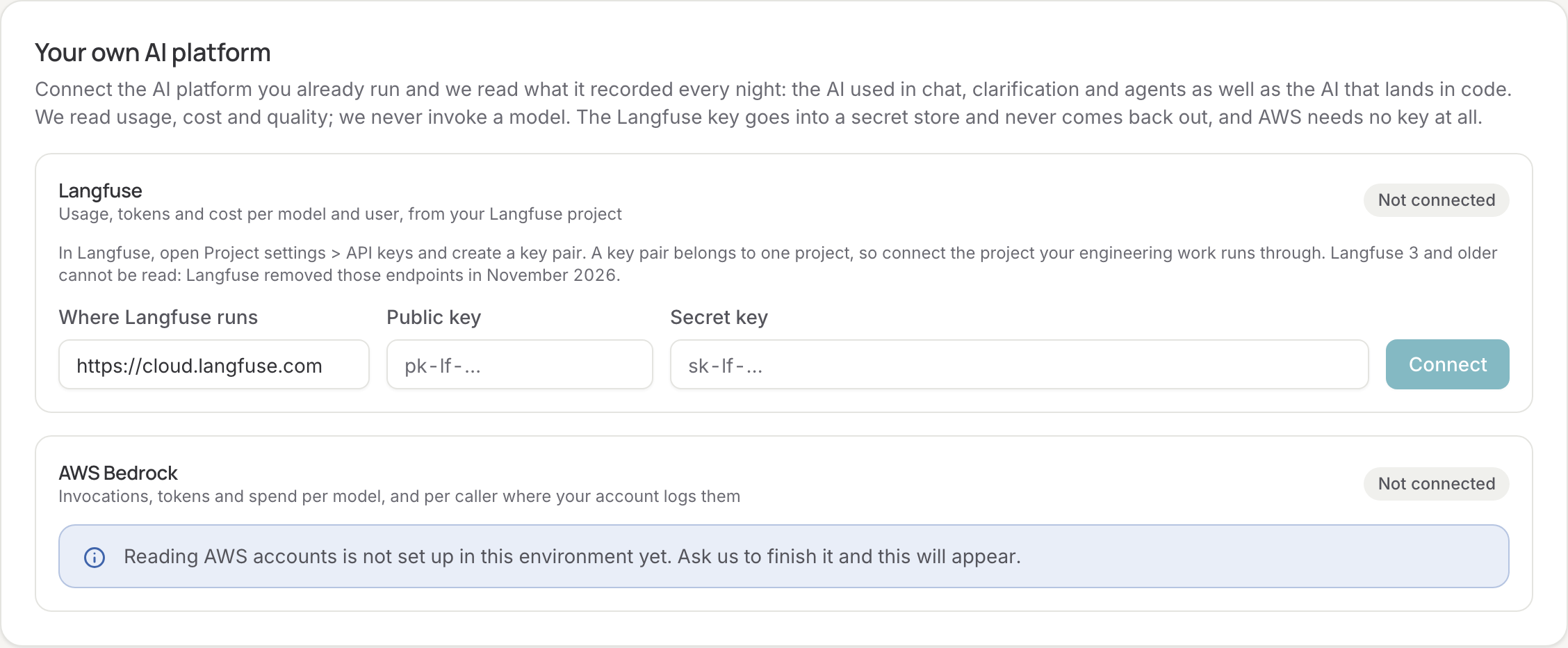
Langfuse
Langfuse gives usage, tokens and cost per day, model and user, for one Langfuse project.
- In Langfuse, open Project settings → API keys and create a key pair. Note both the public key (
pk-lf-…) and the secret key (sk-lf-…); Langfuse shows the secret once. - In Agile Analytics, go to Settings → AI tools → Your own AI platform. Enter where Langfuse runs —
https://cloud.langfuse.comfor the EU region,https://us.cloud.langfuse.com,https://jp.cloud.langfuse.com, or the address of your own installation — paste both keys and press Connect. - Add the rules that say which usage is work on code (below). The first read starts at once and reaches back a quarter; after that it reads every night.
A key pair belongs to one project, so connect the project your engineering work runs through. Langfuse 3 and older cannot be read: Langfuse removed those endpoints in November 2026, and self-hosted installations need version 4 or newer.
The secret key goes into a secret store and never comes back out of Agile Analytics: no settings page and no API call returns it, and only a hint of it is shown. Disconnect destroys it, and can delete what was read along with it.
The cost Langfuse reports is its own estimate from its model price table, not an invoice. Agile Analytics labels it an estimate and never adds it to a bill.
Some Langfuse projects will not group by user. Agile Analytics then keeps the usage as organisation totals and says on the page that there is no caller to attribute, rather than guessing who used what.
Which usage is work on code
A platform does not know what its callers were doing, so you say it. Under Which usage is work on code you add rules: a field, a value and what it counts as. Rules are matched in order and the first one that fits wins.
| Field | Matches |
|---|---|
| Langfuse tag | A tag on the trace, for example codegen |
| Trace name | The name your application gives the trace |
| Environment | The Langfuse environment, for example production |
| Model | The model that was called |
| Request metadata | A value in the request metadata (Bedrock) |
| Inference profile | The Bedrock inference profile the call used |
Usage that matches no rule stays Unclassified. It is never placed in a category by guessing from the model or the volume, and the page says how much of the usage that is, so you know how much the split is worth.
AWS Bedrock
Bedrock gives invocations and tokens per model from CloudWatch, the bill from Cost Explorer, and — where your account logs model invocations — who called each model, which is what allows a split per team.
Agile Analytics holds no key of yours. You create a role in your own account that may read these three things and nothing else, that only our account may assume, and that carries an external id which is yours alone.
Setting it up starts with us: mail support@agileanalytics.cloud and we send you the role to trust and your external id, together with the read-only policy to attach. Until that is arranged the card says so in the app.
Without model invocation logging in your AWS account there is no caller on a Bedrock call. Agile Analytics then reports Bedrock totals per model and says on the page that there is no caller to attribute, instead of dividing the usage over teams by a rule of thumb.
What you see afterwards
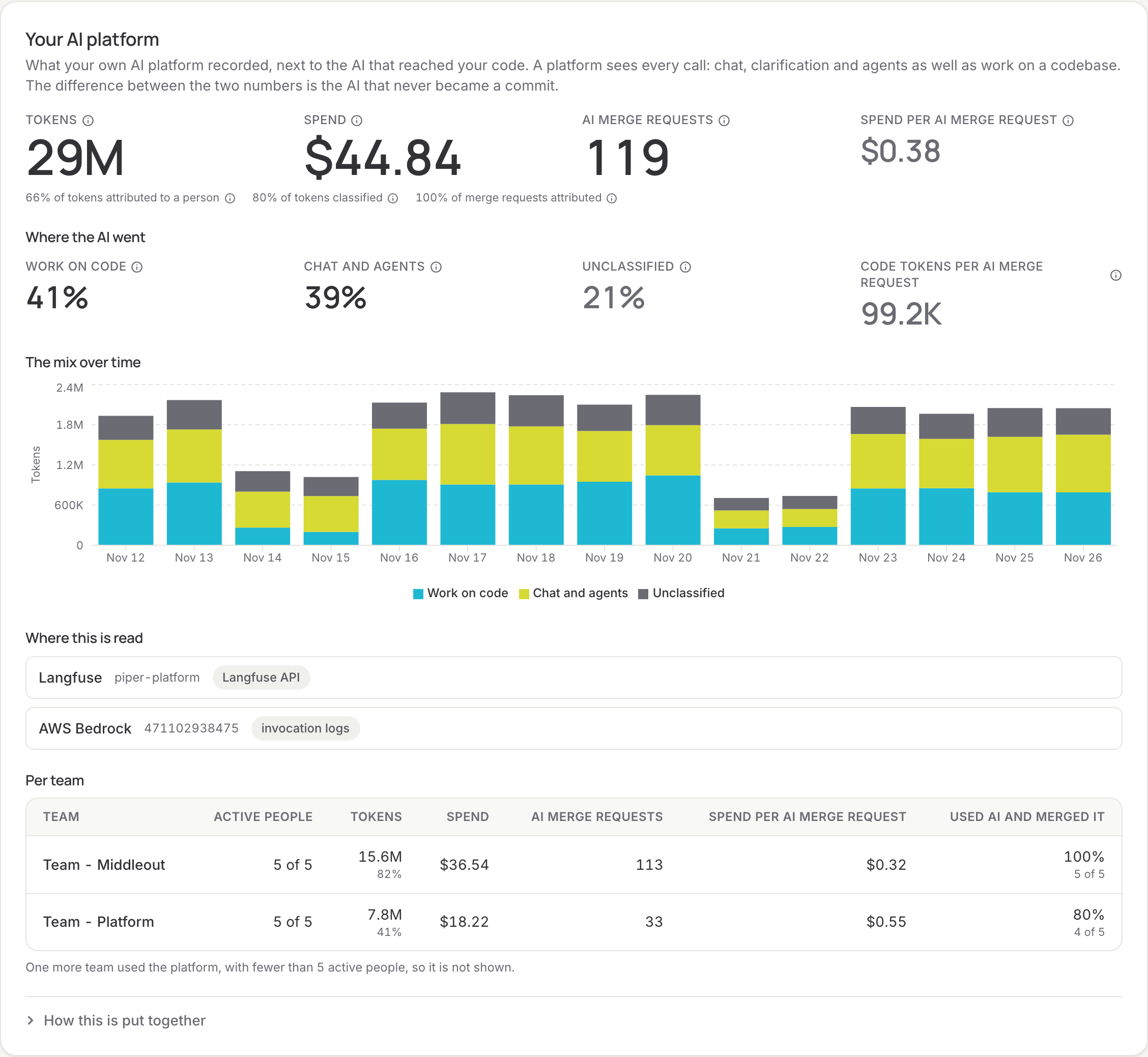
A Your AI platform section appears on the AI impact page with:
- tokens and spend over every connected platform, and the spend per AI merge request as a ratio, not a unit price: most platform usage never becomes a merge request;
- Where the AI went: work on code against chat and agents, with whatever your rules could not place shown as unclassified;
- the share of tokens that could be attributed to a person, and so to a team, and the share your rules could classify;
- Where this is read, naming every platform behind the numbers and why one of them is not contributing.
Licences you entered by hand keep working as they are. The platform's spend is kept apart from them: it is metered usage, not a seat fee, and mixing the two would count the same assistant twice.
Plans
Connecting an AI platform is part of the Enterprise plan, as connecting an AI vendor is. Reading what it recorded comes with AI impact, which is part of Scale-Up and Enterprise.