- Welcome to the Agile Analytics Full Stack Documentation
- 🛠 Getting Started
- General
- [Jira] Connect Agile Analytics to Jira
- [GitLab] Connect Agile Analytics to your GitLab
- [Bitbucket] Connect Agile Analytics to your Bitbucket
- [GitHub] Connect Agile Analytics to your GitHub
- Add repositories to Agile Analytics
- Sprints management
- SAML
- Migration Bug: Post-Mortem
- Add users to your organisation
- Features
Error Budgets
What are Error Budgets
Site reliability engineering (SRE) is a discipline that allows teams to design and operate scalable, resilient systems using a software engineering approach. Gartner defines SRE as a collection of systems and software engineering principles used to build and operate resilient distributed systems at scale. SRE acts as a complement to DevOps practices by managing the risks of rapid change by promoting resilience, accountability and innovation.
Error Budgets enable teams to make decisions on ‘are we focussing on the right things as a team’. It allows the team to see if the time spent on the feature is not taking a toll in production.
When the error budget runs out, the team needs to change direction and make sure it huddles to ensure the systems are stable again and drop any work with regard to features.
Setting up Error Budgets
Step 1. Connect Agile Analytics to your backend
Connect to Google Cloud Monitoring: [Google Cloud Monitoring] Connect Agile Analytics to Google Cloud Monitoring Connect to AWS Cloud Watch: [AWS Cloud Watch] Connect Agile Analytics to AWS Cloud Watch Connect to Prometheus: _(coming soon)_Connect to Datalog: _(coming soon)_Connect to Dynatrace: _(coming soon)_Connect to Elasticsearch: (coming soon)
Step 2. Create API Service
-
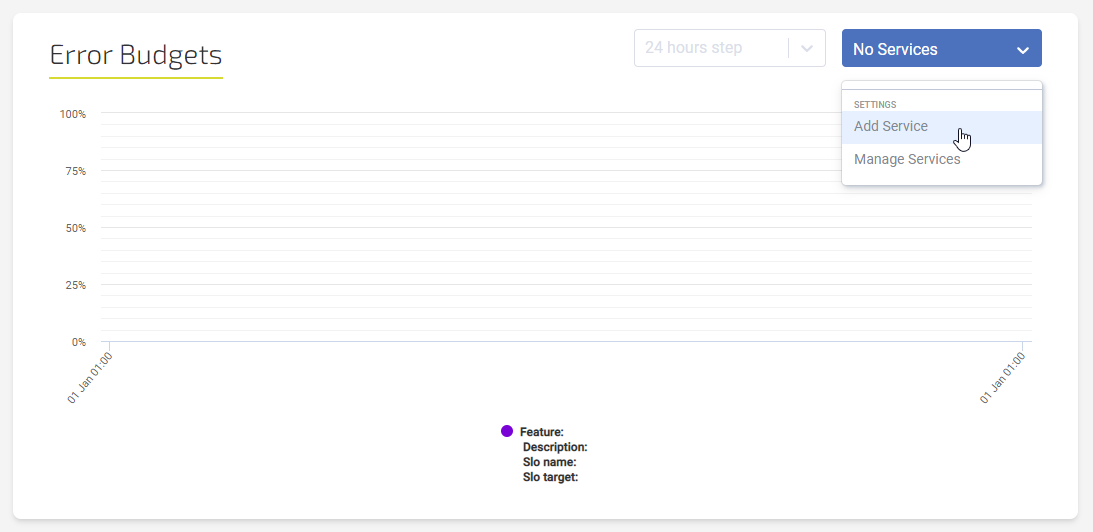
Go to the Error Budgets page and select Add service in the dropdown.
-
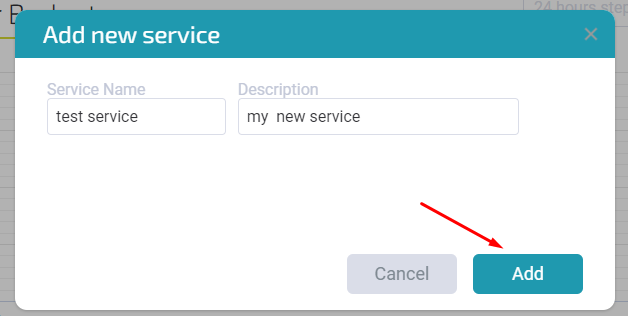
Fill in the service information and click Add.
Step 3. Set up Feature
Click Add Feature +, fill in the form (see filter options below) and click Create.
Filters
Good Bad Ratio
The ratio of Good Events to Valid Events
Parameters: Filter Good, Filter Bad, Filter Valid [2 can be filled out]
Distribution Cut
Number of events above or below a specified threshold
Parameters: Filter Valid, Threshold Bucket*, Good Below Threshold
*Threshold Bucket - defines upper and lower boundaries of the distribution that need to be counted. In the case of latency, a Threshold bucket value set to 19 and Good Below Threshold parameter set to True would mean that all values that are lower than the upper boundary of the 19th bucket will be considered good events and the remaining - bad event. Use this sheet as a reference for different threshold bucket values and corresponding upper and lower boundaries.
Filter Examples
Latency (Distribution cut)
Filter valid:
project="google-project-name"
resource.labels.module_id="module-name"
metric.type="appengine.googleapis.com/http/server/response_latencies"
(metric.labels.response_code = 429 OR
  metric.labels.response_code = 200 OR
  metric.labels.response_code = 201 OR
  metric.labels.response_code = 202 OR
  metric.labels.response_code = 203 OR
  metric.labels.response_code = 204 OR
  metric.labels.response_code = 205 OR
  metric.labels.response_code = 206 OR
  metric.labels.response_code = 207 OR
  metric.labels.response_code = 208 OR
  metric.labels.response_code = 226 OR
  metric.labels.response_code = 304)
Threshold bucket: 19
Good Below Threshold: True
PubSub coverage (Good Bad Ratio)
Filter good:
project="google-project-name"
metric.type="pubsub.googleapis.com/subscription/ack_message_count"
resource.type="pubsub_subscription"
Filter bad:
project="google-project-name"
metric.type="pubsub.googleapis.com/subscription/num_undelivered_messages"
resource.type="pubsub_subscription"
Availability (Good Bad Ratio)
Filter good:
project="google-project-name"
metric.type="appengine.googleapis.com/http/server/response_count"
resource.type="gae_app"
resource.label.module_id="module-name"
(metric.labels.response_code = 429 OR
  metric.labels.response_code = 200 OR
  metric.labels.response_code = 201 OR
  metric.labels.response_code = 202 OR
  metric.labels.response_code = 203 OR
  metric.labels.response_code = 204 OR
  metric.labels.response_code = 205 OR
  metric.labels.response_code = 206 OR
  metric.labels.response_code = 207 OR
  metric.labels.response_code = 208 OR
  metric.labels.response_code = 226 OR
  metric.labels.response_code = 304)
Filter valid:
project="google-project-name"
metric.type="appengine.googleapis.com/http/server/response_count"
resource.type="gae_app"
resource.label.module_id="module-name"