- Welcome to the Agile Analytics Full Stack Documentation
- 🛠 Getting Started
- General
- [Jira] Connect Agile Analytics to Jira
- [GitLab] Connect Agile Analytics to your GitLab
- [Bitbucket] Connect Agile Analytics to your Bitbucket
- [GitHub] Connect Agile Analytics to your GitHub
- Add repositories to Agile Analytics
- Sprints management
- SAML
- Migration Bug: Post-Mortem
- Add users to your organisation
- Features
DORA Metrics
Introduction
DORA metrics measure software delivery velocity and throughput by plugging into all systems used for software development, deployment and operation. The DORA metrics consist of:
-
Deployment Frequency,
-
Lead Time for Changes,
-
Mean Time to Recovery and
-
Change Failure Rate.
These metrics can provide warnings and alerts if engineers are:
-
losing engagement,
-
highlight high and low-performing teams and
-
help companies avoid resorting to quick fixes.
Setting up DORA Metrics
Step 1. Adding Git provider
Connect GitHub: [GitHub] Connect Agile Analytics to your GitHub Connect GitLab: [GitLab] Connect Agile Analytics to your GitLab Connect Bitbucket: [Bitbucket] Connect Agile Analytics to your Bitbucket
Step 2. Selecting repositories you’d like to track
Add repositories to Agile Analytics: Add repositories to Agile Analytics
Step 3. Connecting your ticket feed
Some of the Dora matrics also require access to your ticket feed.
Connect Jira: [Jira] Connect Agile Analytics to Jira
Connect Azure DevOps: (coming soon)**Done!**You’ll be able to see all the repositories which are included in the DORA metrics in the Repositories filter.
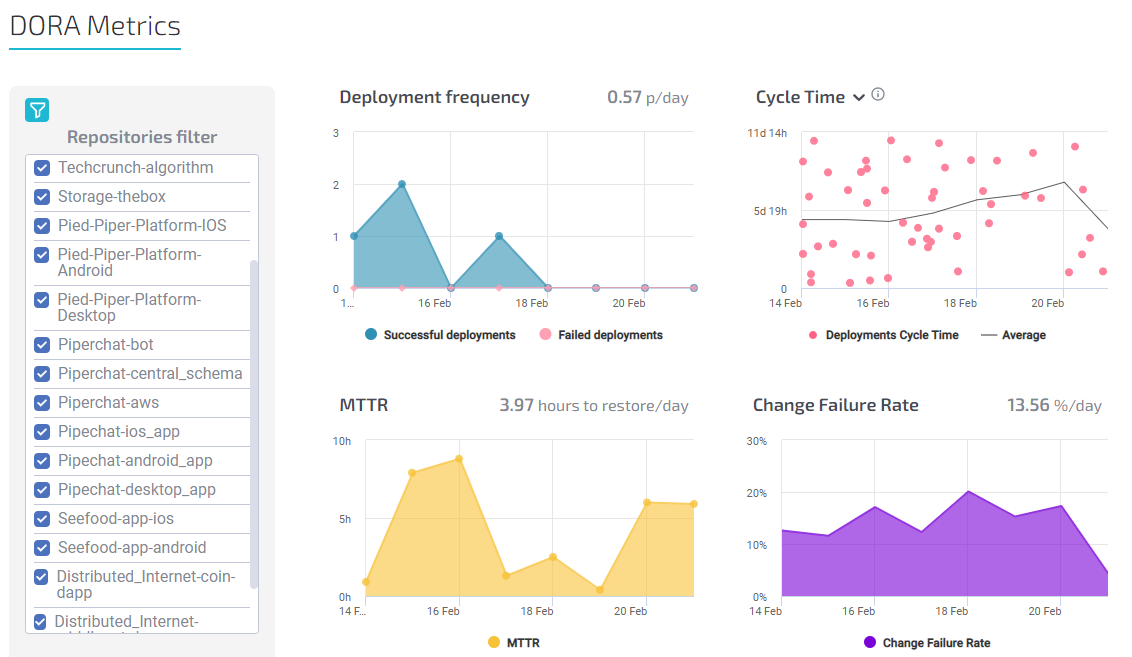
DORA Metrics explained
Find out more about each of the DORA metrics: