Documentation menu
Hours
Hours shows the booked hours per person and project, how much of the contract time was billable, and which hours went to research and development. People book their hours in the app, or Agile Analytics infers them from Jira.
Report
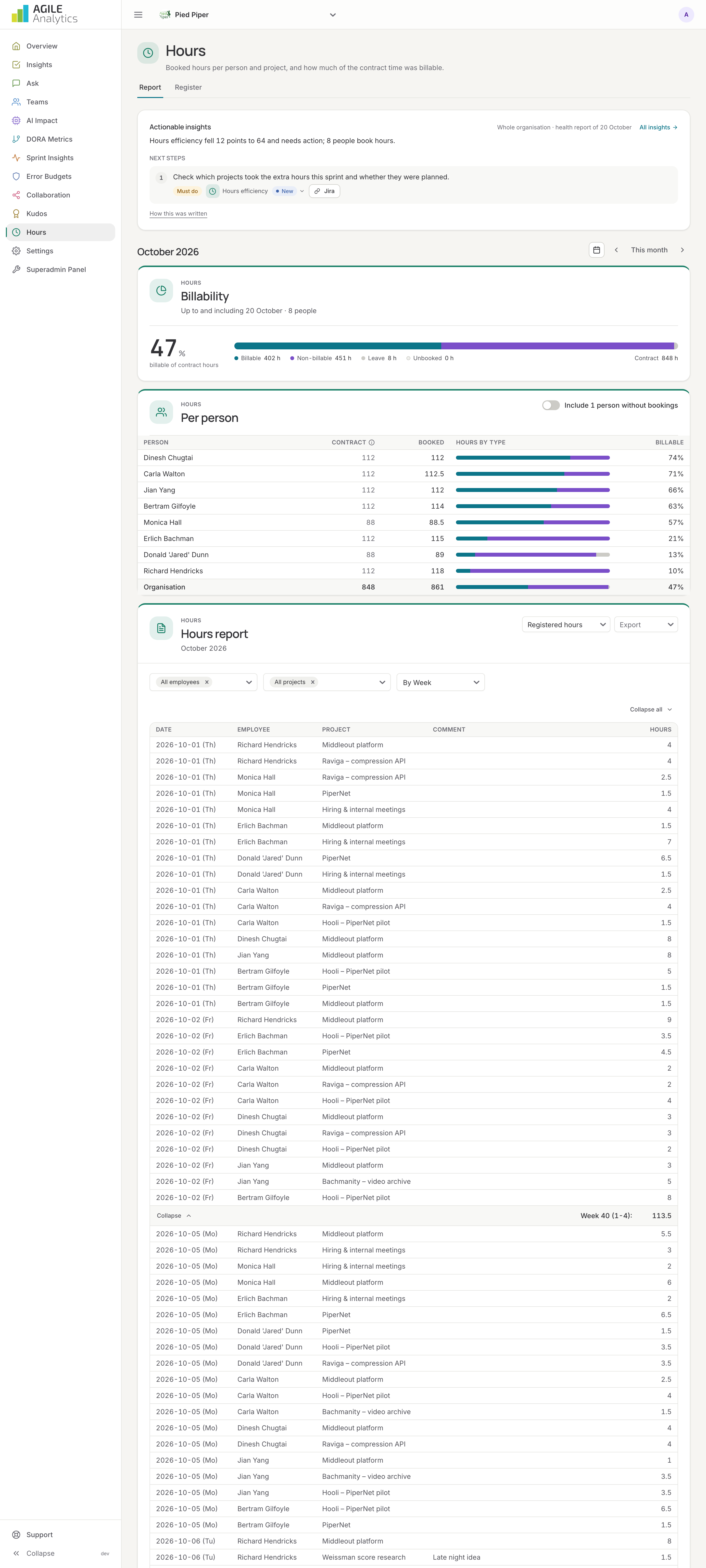
The page opens on the Report tab.
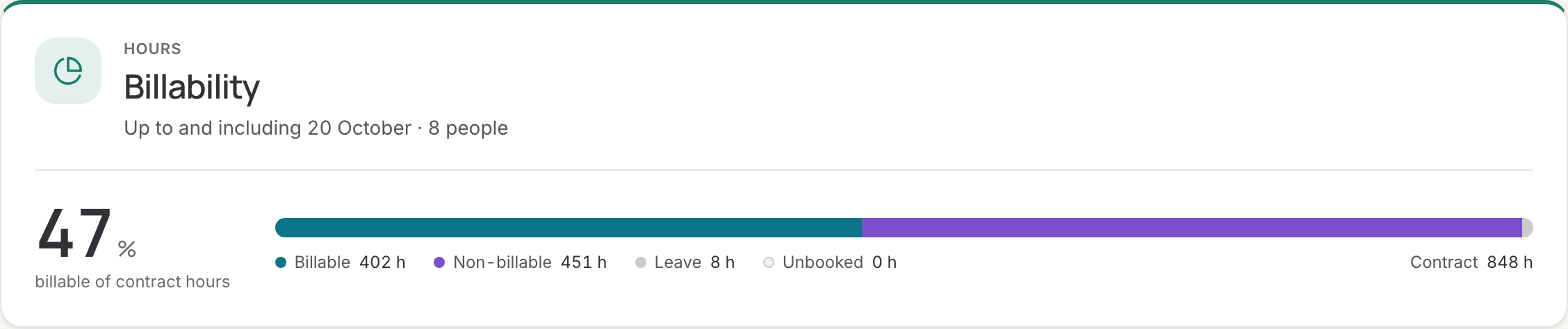
Billability
The first card shows, for the period picked at the top, the billable hours over the contract hours of the organisation, and the hours by type: billable, non-billable and leave (leave counts as non-billable). Contract hours are 8 hours for every contract day in the period; the working days of each person are set under Settings → Users. A running month is measured up to today. The organisation total counts the people who booked hours; tick Include people without bookings to count everyone. The table below gives the same per person: booked, billable, non-billable, leave, contract hours and billability.
If no project is marked billable yet, the card says so: set a category on the projects in the Register tab.
Hours report
The table lists every booking in the period: date, employee, project, description, hours and the tickets it relates to. Filter by project and by employee; download the report as PDF. Switch between Registered hours (booked by hand) and Inferred hours (estimated from Jira).
Register
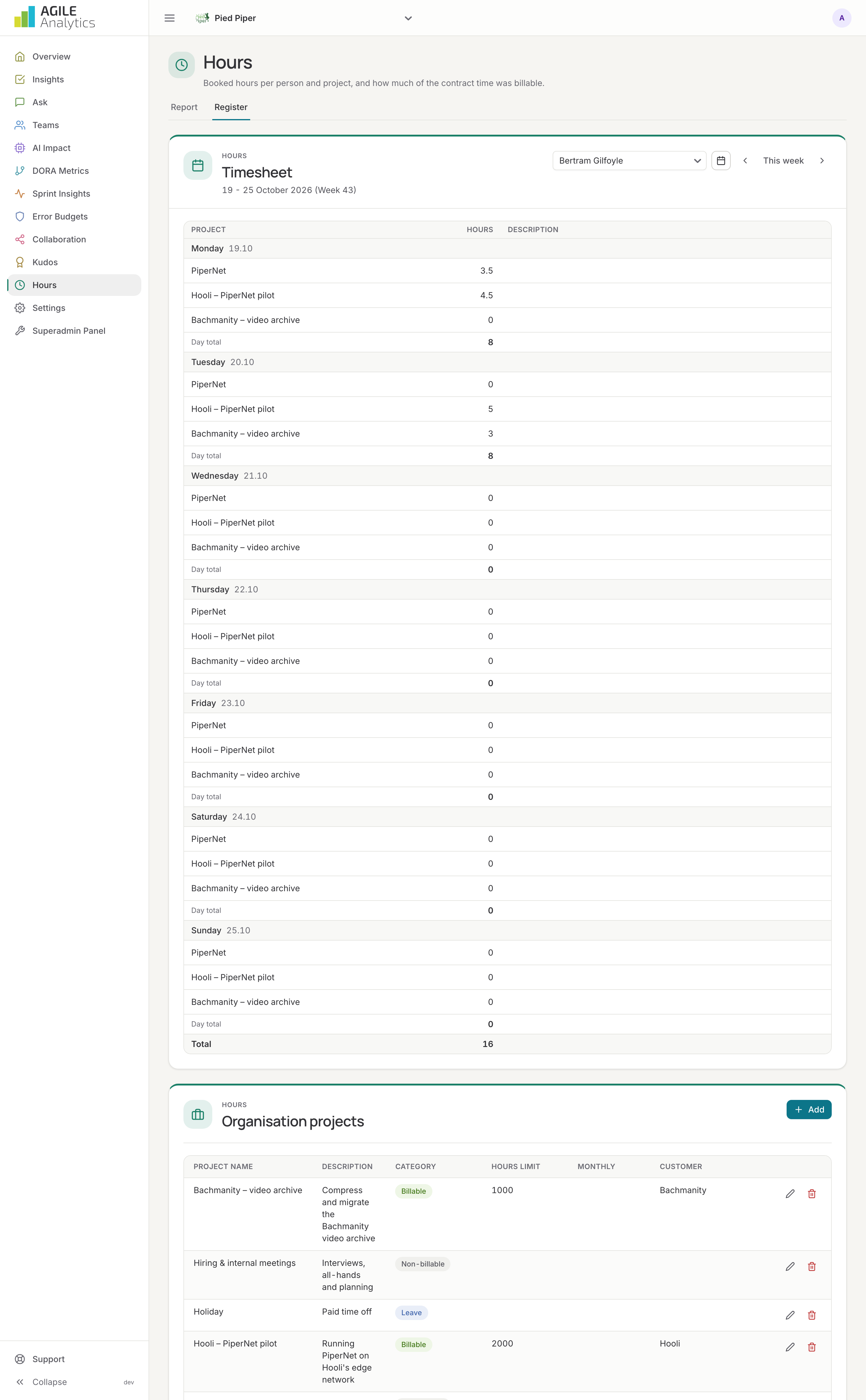
The Register tab is where people book their time.
Projects
Organisation projects are visible to everyone; personal projects only to you. Press Add to create one with a name, description, an optional customer and monthly hours limit, and a category: billable, non-billable or leave. The category drives the billability figures everywhere in the app, including the tile on the overview.
Timesheet
Pick the week, choose a project and enter the hours per day, with a comment or ticket key when useful. A day cannot exceed 24 hours, and a project with a monthly limit stops accepting hours once the limit is reached.
WBSO / R&D
The WBSO / R&D tab turns booked hours into the WBSO hours administration and the R&D capitalisation, from booked hours only (inferred hours and leave never count). Pick a period, this or last year or quarter, or your own dates up to 400 days, and download each report as Excel or CSV. Have your WBSO adviser check the export before you rely on it for RVO.
R&D projects
An admin marks the projects that are WBSO research and development work, with the name or number of the S&O project in your WBSO application, and the projects whose hours are capitalised. Under Evidence from, link a WBSO project to its repositories and Jira projects, so its evidence is limited to that work; without links, all of the person's work in the period counts. Leave projects cannot be marked.
WBSO hours administration
Booked hours per person, S&O project and week or day, with a short description of the work. The description comes from the comments booked with the hours; when someone booked nothing else in a period, the titles of their merge requests and Jira tickets describe it. The Excel file also lists each person's merge requests and tickets per period as evidence. Rows without a description are counted, so you can ask people to add a comment when they book.
Capitalisation
Capitalisable against expensed hours per project and month and, with the cost of an engineering hour set under Settings → AI tools, their cost. Without that rate only hours are shown.
Inferred hours
Agile Analytics also estimates hours from Jira, without anyone booking anything. For every ticket that was In Progress, the time it spent there is divided by the number of tickets the same person had in progress at the same time. A person's working hours per week (Settings → Users) cap the estimate. Only people whose Jira profile is linked under Settings → Users get inferred hours.
Where hours are used
- Hours efficiency, one of the eight health areas on the overview.
- The WBSO hours administration and the R&D capitalisation on the WBSO / R&D tab.
- The billability tile on the overview.
- AI return on the AI impact page: booked hours per merged merge request, in AI-heavy versus AI-light months.
- The assistant: ask how many hours went to a project or what someone booked.