- Welcome to the Agile Analytics Full Stack Documentation
- 🛠 Getting Started
- General
- [Jira] Connect Agile Analytics to Jira
- [GitLab] Connect Agile Analytics to your GitLab
- [Bitbucket] Connect Agile Analytics to your Bitbucket
- [GitHub] Connect Agile Analytics to your GitHub
- Add repositories to Agile Analytics
- Sprints management
- SAML
- Migration Bug: Post-Mortem
- Add users to your organisation
- Features
Connect Google Cloud Monitoring
To connect Google Cloud Monitoring to Agile Analytics, do the following:
-
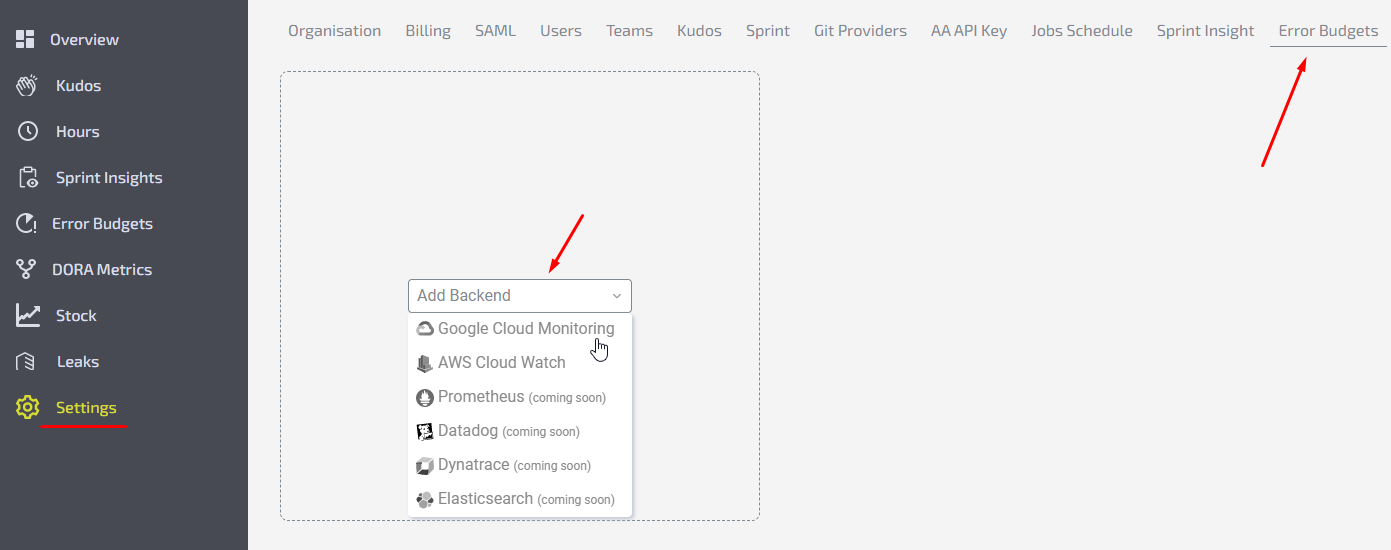
Go to Settings → Error Budgets tab.
-
Click to “Add backend” and choose Google Cloud monitoring.
-
Fill in the form fields.Name - give a name to your backend.Project ID - a globally unique identifier for your project in Google Cloud Monitoring. Could be found in Google Cloud console → Manage resources → select a project and click on 3 dots → Settings → copy Project ID.Credentials JSON - could be found in Google Cloud console → Menu → APIs & Services→ Select Service account → Keys → Add Key → Key type - JSON → Create. Upload the file you got to Agile Analytics.
-
Click Test to check if the provided creds are valid.
-
Click Save.