- Welcome to the Agile Analytics Full Stack Documentation
- 🛠 Getting Started
- General
- [Jira] Connect Agile Analytics to Jira
- [GitLab] Connect Agile Analytics to your GitLab
- [Bitbucket] Connect Agile Analytics to your Bitbucket
- [GitHub] Connect Agile Analytics to your GitHub
- Add repositories to Agile Analytics
- Sprints management
- SAML
- Migration Bug: Post-Mortem
- Add users to your organisation
- Features
Connect GitHub
To connect Agile Analytics to your GitLab account, do the following:
-
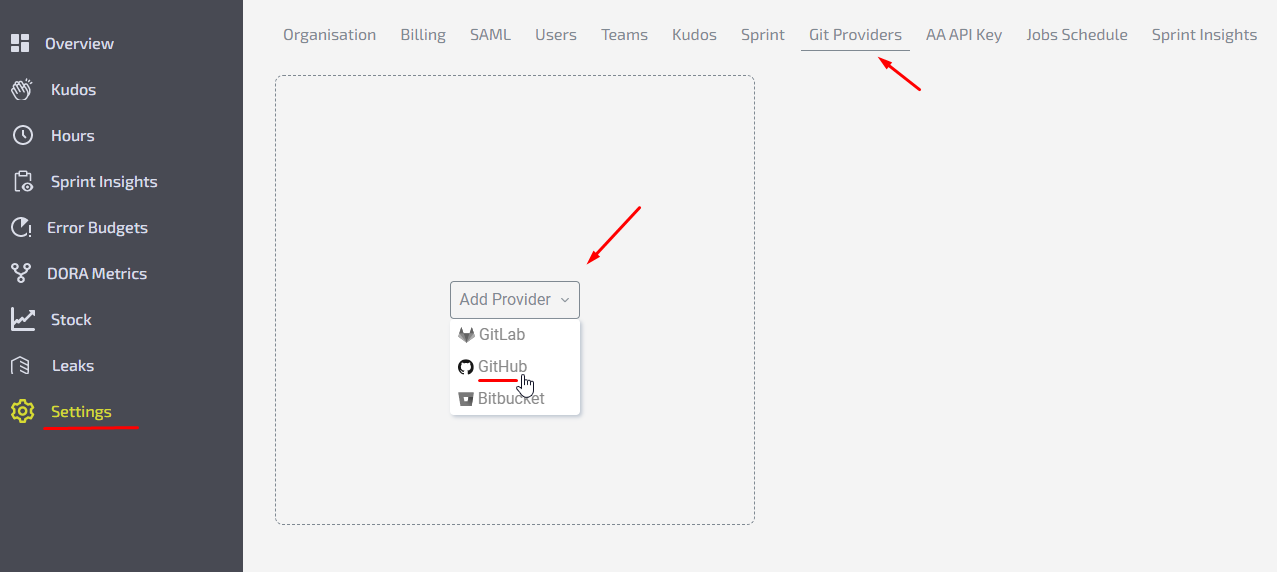
Go to Agile Analytics → Settings → Git Providers tab.
-
Click “Add Provider“ and pick GitHub.
-
Give your provider a name and paste your GitHub account's access token (where do I get a GitHub access token).
-
Press “Test“. If the token is valid you’ll get a list of repositories we have access to scan. In case everything is correct, click “Save“.All set!