Real-Life Examples of Service Level Objectives (SLOs)

Published on 13 June 2025 by Zoia Baletska
SLI, SLO and SLA: the distinction that causes the confusion
Three acronyms, routinely used as if they were interchangeable. They are not, and the difference matters because only one of them has a lawyer attached.
SLI — indicator. What you measure. A ratio of good events to valid events: "the percentage of requests that returned successfully". It is a number, with no opinion attached.
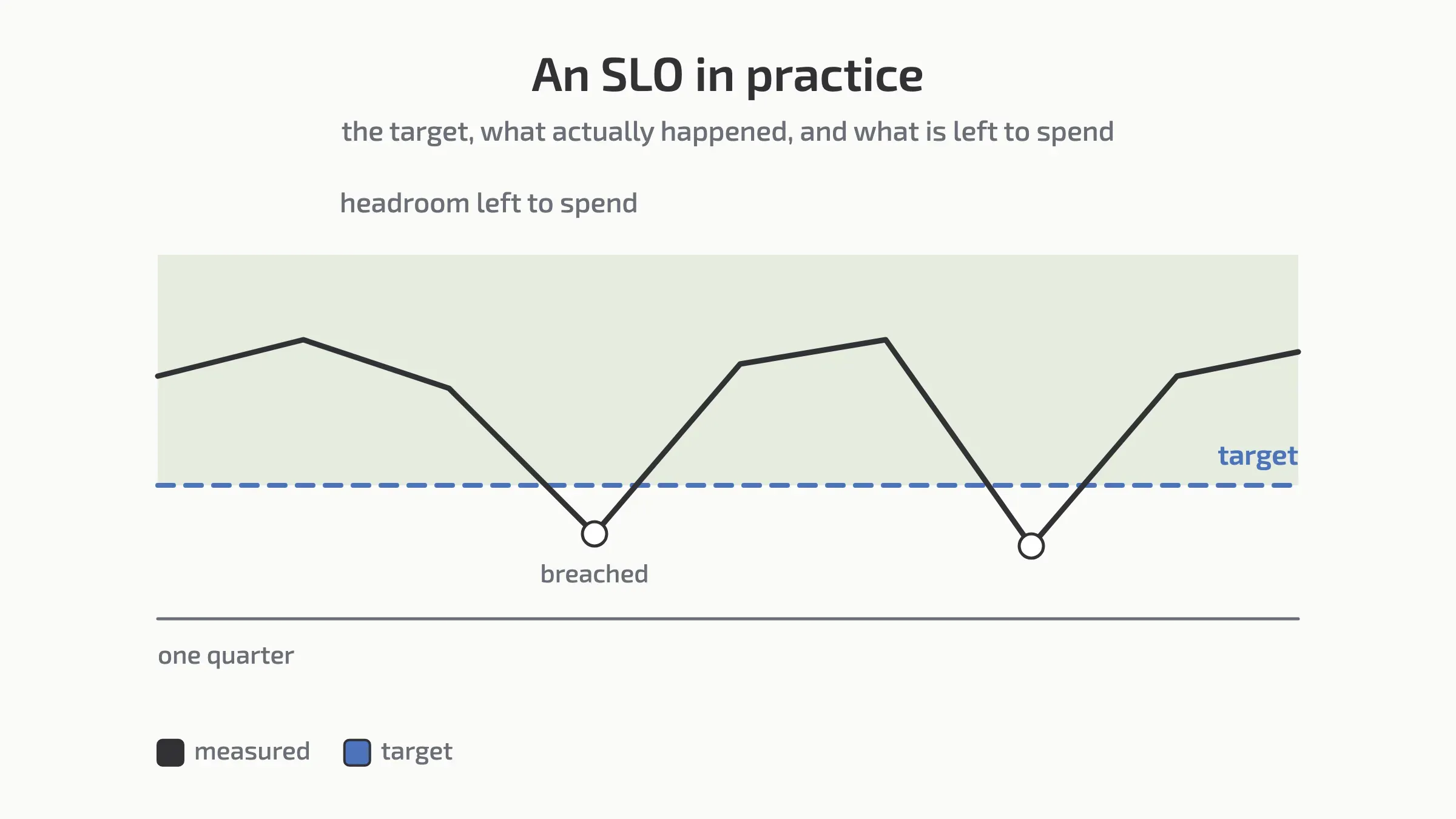
SLO — objective. The target for that number, over a window. "99.9% of requests succeed, measured over 28 days." This is an internal commitment your team sets and can change.
SLA — agreement. A contractual promise to a customer, with financial consequences when you miss it. External, negotiated, and expensive to get wrong.
The practical rule: your SLO should always be stricter than your SLA. If you promise a customer 99.5% and target 99.5% internally, you are in breach the moment you are even slightly off. Teams typically set the internal objective meaningfully tighter, so the alert fires long before the contract does.
The gap between an SLO and 100% is the error budget — the unreliability you have decided you can afford, and the thing that turns "should we ship or stabilise?" into a question with an answer.
Most teams need an SLI and an SLO. Comparatively few need an SLA, and writing one before you have run an SLO for a while is how organisations end up contractually committed to a number nobody has ever measured.
Where to go from here
Setting your first ones: how to set SLOs that developers actually respect
When they are not working: why your SLOs might be failing
Picking a realistic target: the truth about the 99.999% SLO
Tying them to experience: how to align SLOs with user experience
Services with no external users: SLOs for internal services
Reporting on them: SLO dashboards that tell a story
Real examples, from working systems
Service Level Objectives (SLOs) aren’t just for massive cloud providers or SRE teams at Google. They’re highly relevant for any modern software development team that wants to improve reliability, performance, and customer experience, without burning out developers.
In this article, we’ll examine real-world, actionable SLO examples used by actual engineering teams – from frontend to backend, APIs to CI/CD. These examples show how to turn vague reliability goals into measurable commitments.
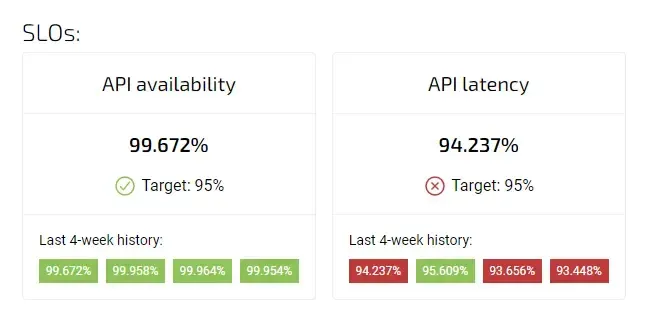
SLOs in Agile Analytics
1. Frontend / Web App Team
Why these SLOs? Frontend performance directly impacts user satisfaction and business outcomes. Metrics like page load times and conversion-critical flows (logins, sign-ups) are chosen because they reflect the real experience of end users. These SLOs help keep UX fast and frictionless.
🧪 Page Load Times
-
99% of homepage loads complete in under 2 seconds for users on a fast network, measured over a 7-day rolling window.
-
95% of route changes on SPA are complete in under 500ms.
🎯 Core User Journeys
-
98% of logins succeed on the first attempt within 3 seconds.
-
99.5% of user sign-ups complete without error.
2. Backend / API Team
Why these SLOs? APIs are the backbone of most modern apps. Teams focus on low latency, low error rates, and stability during retries. These SLOs are chosen because they impact both frontend users and internal dependencies across microservices.
⚙️ Request Latency
-
99% of POST /api/checkout calls complete within 300ms over 30 days.
-
95% of internal service-to-service calls respond in under 100ms.
❌ Error Rate
-
<0.1% of total requests return 5xx errors, excluding deployments.
-
No more than 1% of requests to /api/payments fail per week.
🔁 Retry Behavior
- 99.9% of retryable failures are resolved within 3 retries.
3. Database / Storage Team
Why these SLOs? For data-heavy applications, availability and consistency are non-negotiable. These SLOs ensure the database team maintains speed and correctness under load while minimising risks in backup and recovery.
🔒 Data Consistency & Availability
-
100% of writes to the billing database are acknowledged within 100ms.
-
99.99% of read requests to the customer profile table succeed without stale data.
💾 Backup SLO
- All production data is backed up every 6 hours, with recovery success >99.9% verified monthly.
4. DevOps / CI/CD / Platform Team
Why these SLOs? CI/CD stability is critical to developer productivity and deployment velocity. These metrics help platform teams ensure high availability and fast recovery, while maintaining low rollback (undone release) rates and efficient build cycles.
🚀 Deployment Reliability
-
<1% of production deployments trigger a rollback.
-
95% of CI/CD pipelines complete successfully on the first try.
🧯 Incident Response
-
Mean Time to Recovery (MTTR) for Sev-1 incidents stays under 30 minutes.
-
Alerts are acknowledged within 5 minutes 99% of the time during business hours.
📦 Build Times
-
95% of builds complete in under 10 minutes.
-
90% of staging deployments finish within 15 minutes of commit.
5. Mobile / Cross-Platform Teams
Why these SLOs? Mobile users are especially sensitive to crashes and launch delays. These SLOs aim to provide a stable, responsive experience across platforms by tracking crash rates and performance on real devices.
📱 Crash-Free Sessions
-
Crash-free rate of >99.5% on iOS and Android apps, measured weekly.
-
App launch time under 2 seconds for 95% of users.
6. QA / Testing Automation
Why these SLOs? Automated tests must be fast and reliable to support continuous delivery. These SLOs highlight how test flakiness and long runtimes impact confidence in the release process and slow down development.
⏱️ Test Reliability
-
98% of end-to-end test suites pass on the main branch within 20 minutes.
-
90% of flaky tests are triaged within 2 days of detection.
Tracking Availability SLO in Agile Analytics
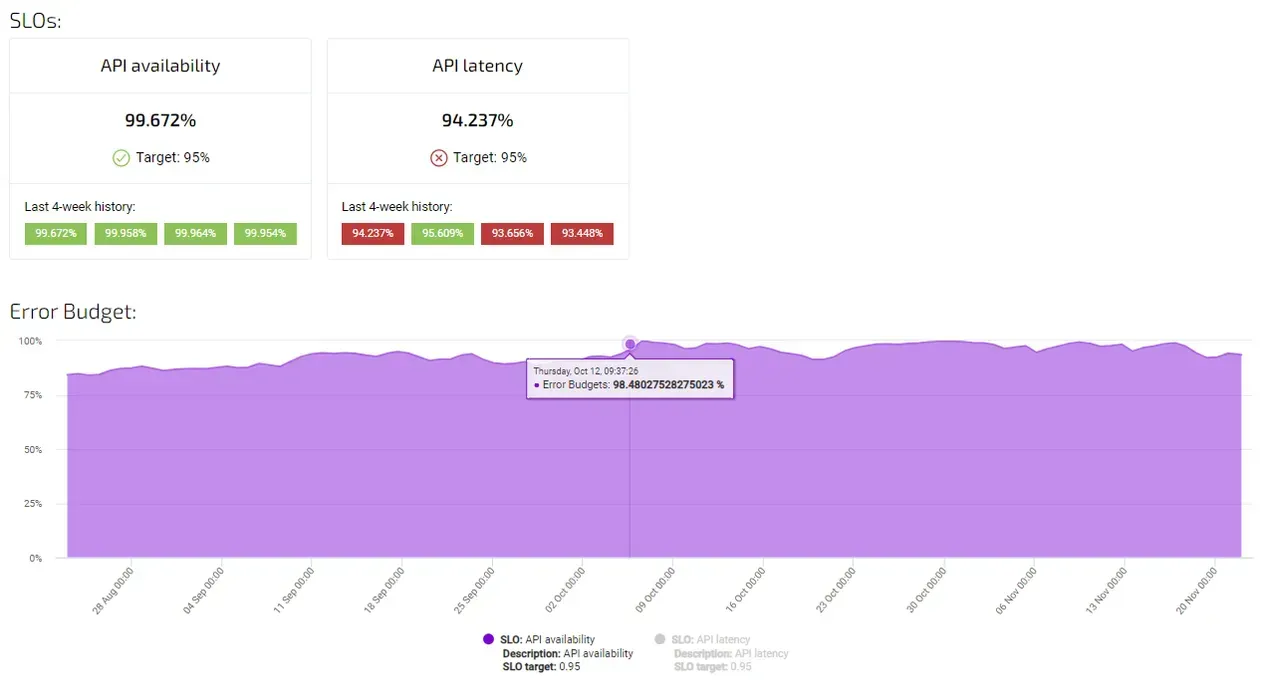
tracking availability SLO in Agile Analytics
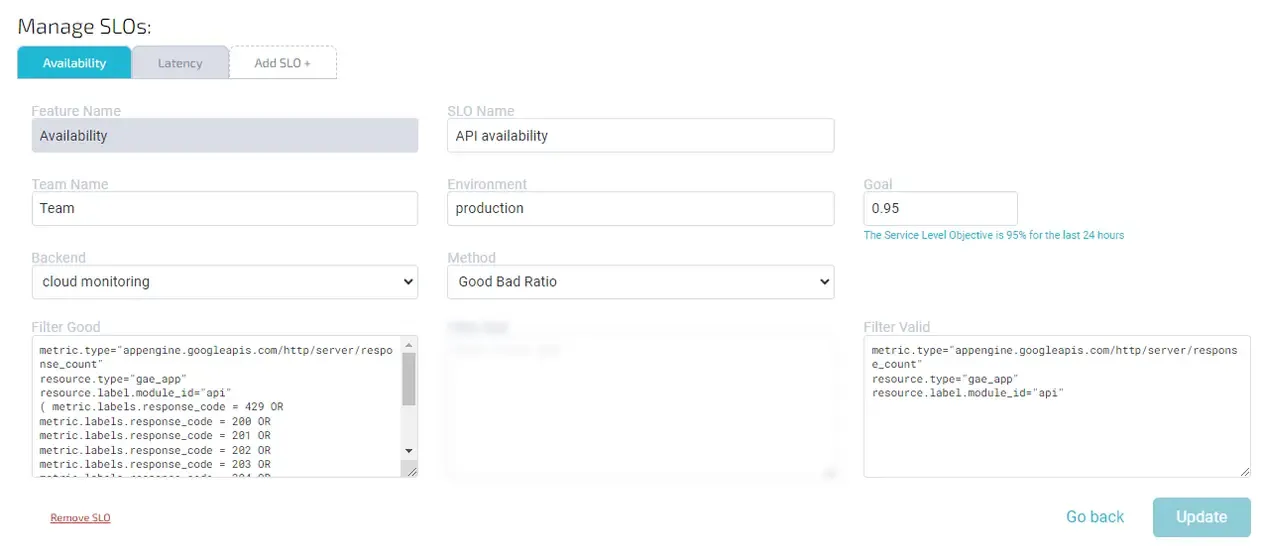
Common filters to measure availability (good-bad ratio):
Filter good:
1project="google-project-name"
2metric.type="appengine.googleapis.com/http/server/response_count"
3resource.type="gae_app"
4resource.label.module_id="module-name"
5(metric.labels.response_code = 429 OR
6  metric.labels.response_code = 200 OR
7  metric.labels.response_code = 201 OR
8  metric.labels.response_code = 202 OR
9  metric.labels.response_code = 203 OR
10  metric.labels.response_code = 204 OR
11  metric.labels.response_code = 205 OR
12  metric.labels.response_code = 206 OR
13  metric.labels.response_code = 207 OR
14  metric.labels.response_code = 208 OR
15  metric.labels.response_code = 226 OR
16  metric.labels.response_code = 304)
Filter valid:
1project="google-project-name"
2metric.type="appengine.googleapis.com/http/server/response_count"
3resource.type="gae_app"
4resource.label.module_id="module-name"
Setting up a Latency SLO in Agile Analytics
Here is a common Latency SLO (Distribution cut) setup in Agile Analytics:
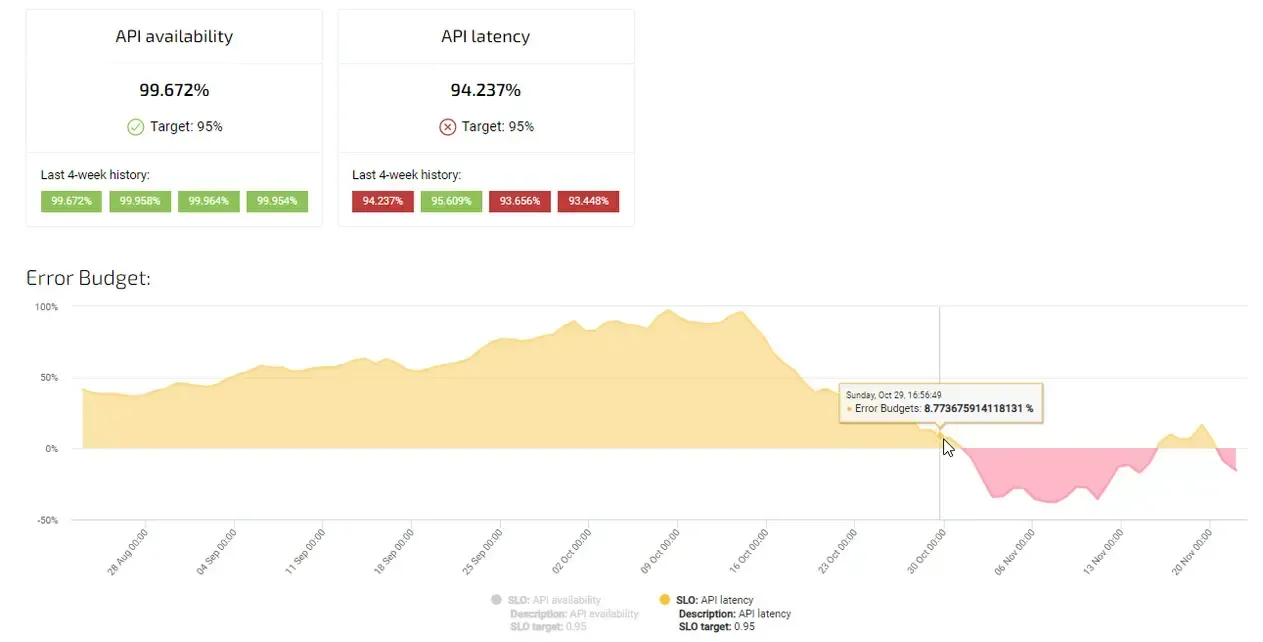
tracking latency SLO in Agile Analytics
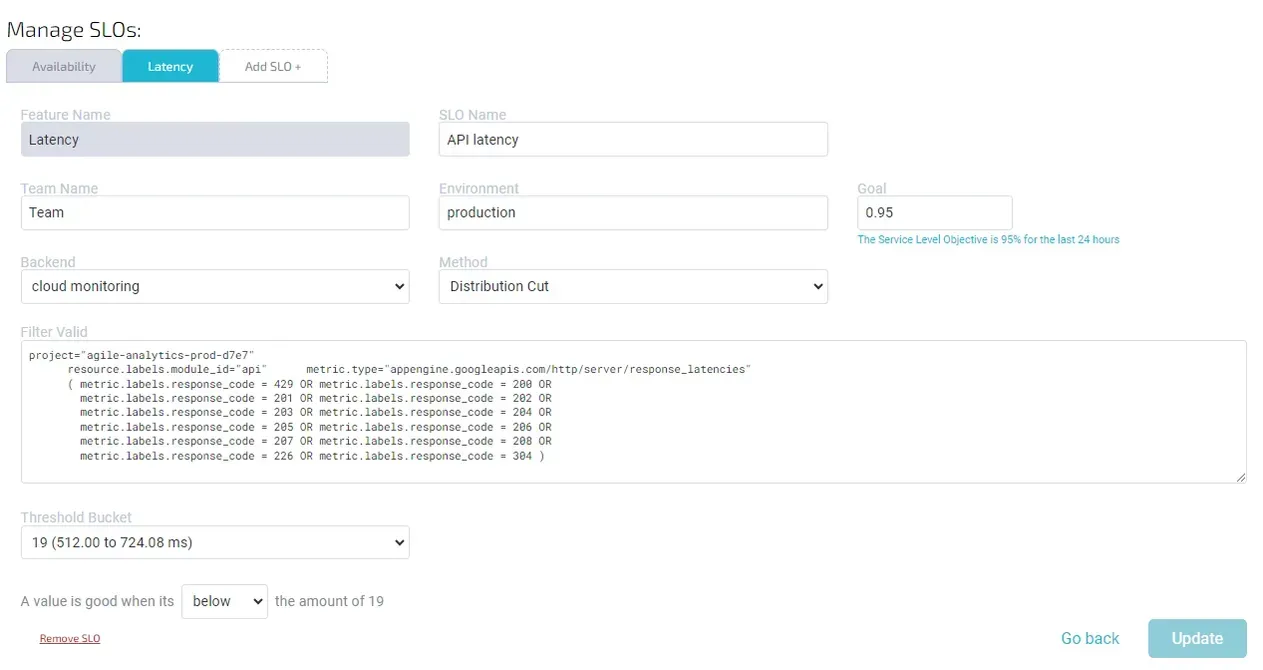
Filter valid:
1project="google-project-name"
2resource.labels.module_id="module-name"
3metric.type="appengine.googleapis.com/http/server/response_latencies"
4(metric.labels.response_code = 429 OR
5  metric.labels.response_code = 200 OR
6  metric.labels.response_code = 201 OR
7  metric.labels.response_code = 202 OR
8  metric.labels.response_code = 203 OR
9  metric.labels.response_code = 204 OR
10  metric.labels.response_code = 205 OR
11  metric.labels.response_code = 206 OR
12  metric.labels.response_code = 207 OR
13  metric.labels.response_code = 208 OR
14  metric.labels.response_code = 226 OR
15  metric.labels.response_code = 304)
Threshold bucket: 19 Good Below Threshold: True
Conclusion
SLOs don’t need to be perfect – they need to be useful. Start with one or two critical services or user flows. Make the SLOs visible to your team. Review them monthly. Use them to guide conversations between engineering, product, and ops.
The best-performing teams don’t treat SLOs as a burden – they treat them as a tool for focus, clarity, and quality.
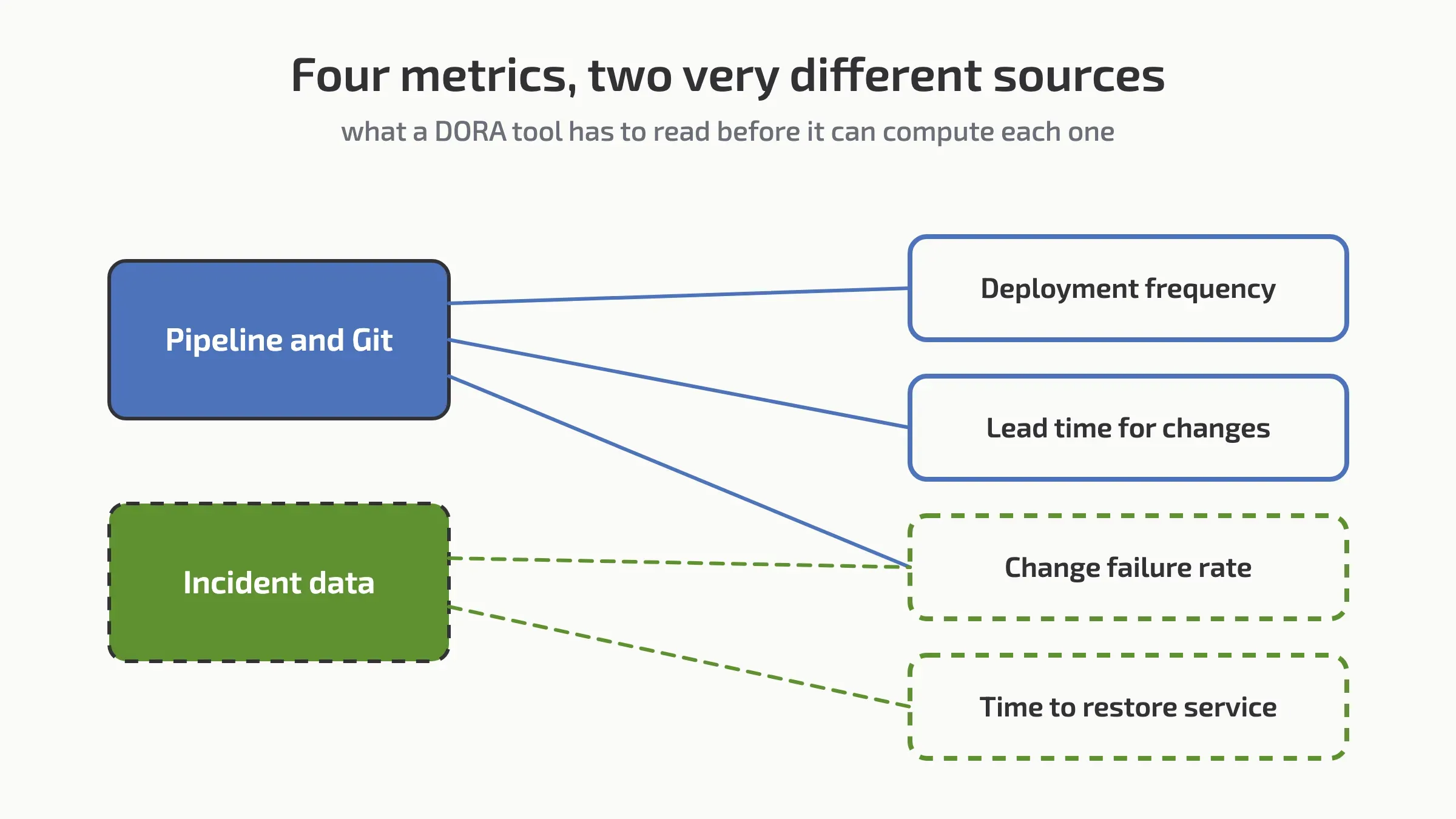
Want to monitor your SLOs alongside DORA metrics like Lead Time (from commit to running in production) and Change Failure Rate (the share of releases that need a fix)? Try Agile Analytics to track what matters in your delivery pipeline.
Case studies: four companies running SLOs in production
The examples above are patterns. These are organisations that adopted them at scale, and what changed when they did.
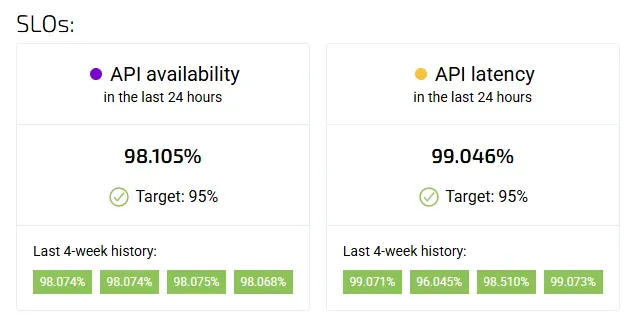
Service Level Objectives (SLOs) and error budgets are fundamental components of Site Reliability Engineering (SRE), enabling organizations to balance system reliability with the pace of innovation. By setting clear reliability targets and defining acceptable margins for errors, companies can make informed decisions about feature rollouts and system maintenance. Several leading tech companies have successfully implemented these concepts to enhance their service reliability.
Evernote's Transition to SLO-Centric Operations
Evernote, a cross-platform app with over 220 million users, undertook a significant technological revamp to increase engineering velocity while maintaining service quality. Transitioning from traditional operations to a public cloud infrastructure, Evernote introduced SLOs to align internal teams and ensure user satisfaction. This shift allowed the company to focus on product engineering that directly impacted customer experience, moving away from routine data center maintenance [1].

The Home Depot's Measurement of SLOs
The Home Depot (THD) adopted SLOs to enhance service reliability. While specific measurement styles, Service Level Indicators (SLIs), and implementation details differed from other companies, THD's approach underscores the adaptability of SLO frameworks to meet unique organizational needs [2].

Google Cloud's Key Management Service (KMS) Implementation
Google's Cloud Key Management Service (KMS) team set a 99.99% availability SLO upon the service's introduction. By closely monitoring and iterating on the service, the team not only met but exceeded this high availability target, demonstrating the effectiveness of stringent SLOs in guiding reliability efforts [3].

HubSpot's Commitment to Platform Uptime
HubSpot, a marketing and sales software company, established an SLO requiring at least 99.95% platform uptime. Through continuous monitoring, regular maintenance, and swift issue resolution, HubSpot has maintained an uptime exceeding 99.99% in recent years, reflecting a strong commitment to service reliability [4].

Implementing Error Budgets for Balanced Development with Agile Analytics
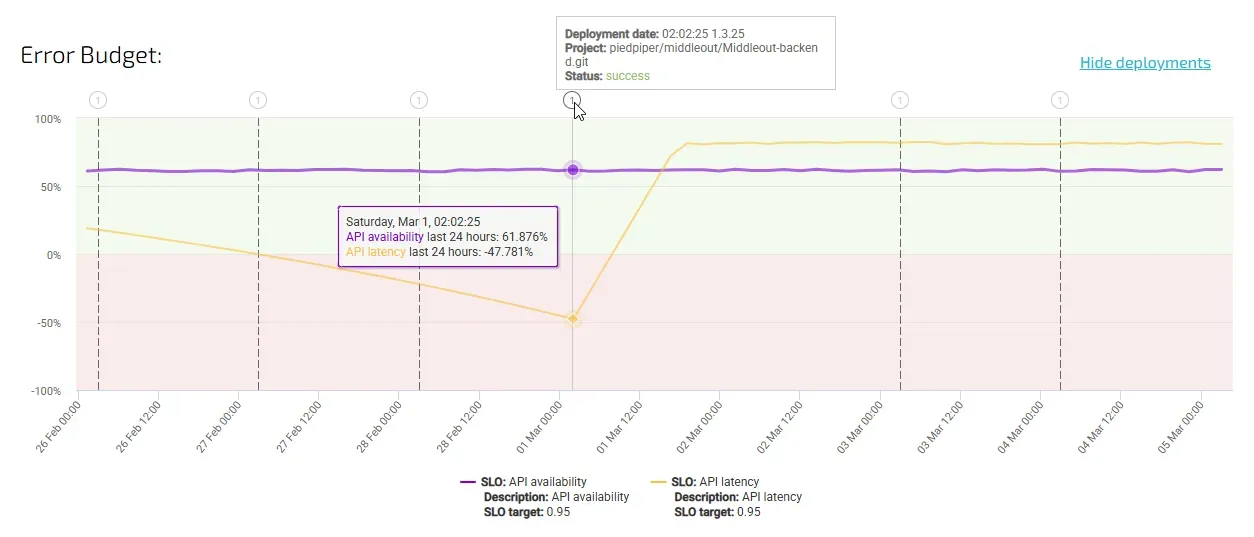
Error budgets serve as a mechanism to balance the introduction of new features with system reliability. For instance, a service with a 99.9% availability SLO has a 0.1% error budget, equating to 1,000 errors per 1,000,000 requests over a specific period. Exceeding this budget prompts teams to prioritize system stability over new developments, ensuring that reliability standards are upheld.
However, tracking and managing error budgets effectively requires visibility into real-time performance metrics and historical trends. This is where Agile Analytics comes into play. By offering actionable insights into service-level indicators (SLIs), SLO breaches, and error budget consumption, Agile Analytics helps teams make informed decisions about when to ship features and when to focus on reliability improvements. With built-in dashboards, anomaly detection, and trend analysis, teams can proactively address potential reliability risks before they escalate into major incidents.
Conclusion
The experiences of Evernote, The Home Depot, Google, and HubSpot illustrate the tangible benefits of implementing SLOs and error budgets. By defining clear reliability targets and acceptable error margins, these companies have improved their service reliability, leading to enhanced user satisfaction and operational efficiency.
For organizations looking to streamline their SLO tracking and error budget management, Agile Analytics provides a comprehensive platform that integrates real-time data, automates monitoring, and offers predictive analytics. It serves both the SRE team aiming to prevent unplanned downtime and the product leader balancing innovation with stability. Either way, your SLOs drive business success rather than becoming just another metric on a dashboard.
Less guessing. More shipped software.
Measure faster — lead time, review wait and deployment frequency per team, every sprint
Guard quality — change failure rate, MTTR and Error Budgets
Prove the gain — feature work versus maintenance, from your own data
See it in 30 minutes — on your own data, not a slide deck